I'm happy to be here today sharing an idea-ology project with a March theme! My substrate is a square Vignette box that is 5.5 x 5.5". An easy size to work with - it will take you a day to make, not a week! I wanted to use the word Lucky and it just happened to be the perfect size to reach across the 5.5" front! This project looks great with the lights on, but just as cute with the lights off. I think the velum gives a nice contrast to the gold Mini Stencil Chips! Well, enough talking, let's get started.

Again, I'm starting with the largest square Vignette Box as my base.
I will need a shelf for my idea to work, so I cut a piece of foam core to fit the Vignette. It should be flush with the depth of the box and fit snugly across (approximately 1 1/4 x 5 1/8"). I used a rotary cutter to cut the foam core, but you could also use a metal ruler and a cutting knife.
Set the foam core to the side while you add paper to the outside of the box.


Add Design Tape Trims to the lip edge with Collage Medium.
Once the Collage Medium is dry, add Walnut Stain Distress Crayon to age the paper. Use a wet wipe to mottle the finish.
 Before we add the shelf, we need to make the word strip from Mini Stencil Chips. Tape the word together, then add velum to the back. I'm going to add Tiny Lights to the compartment so the velum will help to diffuse the light.
 Now it's time to add the "shelf". I just added Collage Medium to three sides of the foam core and slipped it into place. Make sure the self is level.

 But the easiest way is to use the Stencil Chip word as your guide. The Stencil Chips will hide the edge of the shelf. For now, add the shelf with Collage Medium and let it dry for at least 30 minutes.
  I used a drill to make a hole in the bottom compartment so I could add Tiny Lights.

 A wanted a more industrial look so I added Screw Heads to some of the Stencil Chips.
 I scribbled Walnut Stain Crayon over the top of them so the were not so pristine looking and used a small paint brush to work the crayon around. I also added Cello Sticker Tape in a few places.
 INSIDE:
 I also painted a knob with white paint. Once dry, I scribbled Distress Crayon over the top to age. Remember this technique from my last post, "10 Ways to use Distress Crayons"? It was number 5 - Faux Patina.
 I added more Worn Wallpaper to the back of the box before securing the Tiny Lights in place with Scor-tape.
 So to finish up I needed to add more dimension to the inside, so I decided to use the Wildflower Stems 2. I thought the stem on the right looked kinda like clovers. I sprayed a piece of Distress Watercolor Cardstock with Spray Stain then cut out three stems with the die.
 I thought I better show what I did here. I really only wanted the top part of the tall stem, so I cut one whole (where the die is in the photo), then I cut two more times of just the top portion of the stem.
 I used the top of one of the pieces as my base. Then cut leaves to from the leftovers. I took the leaves and glued them to the base, making each stem 3D. I made TWO of these + a couple extra leaves that are singles.
 This is one base + leaves. You can see that I bent the top leaves so they stand away from the base.
 I glued one to the top of the box - there are small foam squares under to leaves that hang over the Snapshot, so they are actually connected to the Snapshot, not just floating over the top.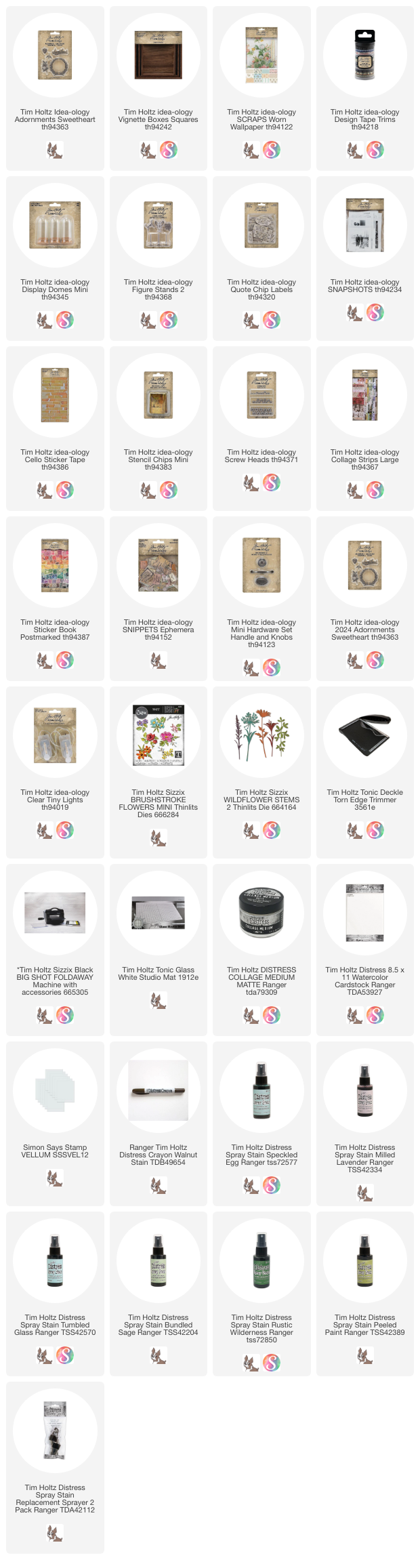


You could use a ruler to measure the compartment...

NOTE: Do not add the Stencil Chip word till after the Tiny Lights are in place. I wanted a "green" theme so I used Large Collage Strips for the background and the top of the shelf. Again, using Collage Medium to adhere the paper, then adding a a layer over the top to seal the paper.
 Once the Collage Medium was dry, I added Walnut Stain Distress Crayon over the background to give it a bit of grunge (especially in the corners).


Once the lights were in place, I added the Stencil Chip word.
PLEASE NOTE: I used Collage Medium for the bottom and sides, but I used Scor-tape along the foam core.


For the scene, I started with a Snapshot from the original package of Snapshots. It looked like a lucky day to me!
I used Distress Crayons to add color to the Snapshot. The cotton swabs helped give the scene a blurry appearance, using just dots of color in the background along the boardwalk, like the photo had been hand tinted.
 In my last post I talked about when and why I choose to "seal" a photo with Fixative spray. This is one of those times. I wanted to add ink details over the crayon work and that can be difficult since water will wash the crayon away. So I went to the garage to spray Fixative over the top of the Snapshot and by the time I got back to the craft room, it was dry and ready to go. I made a puddle of ink and water, then dipped the Snapshot into the mix, drying with a heat tool. Any excess ink was removed with a paper towel.
 Next is the Mini Display Dome with the metal clover from the Figure Stand 2 package. You can see I painted it with Rustic Wilderness Distress Paint (sanded with steel wool once dry). The cork base of the Mini Display Dome was painted with Ground Espresso Distress Paint then sanded back. String and Snippets Curator were used on the outside of the glass.
 Add your pieces to the Vignette with Collage Medium. I have a small wood block behind the Snapshot so it can stand up and be at an angle free from the back wall of the vignette. Once the wood block is secure, the Quote Chip can be added to the Snapshot with a thin foam square.


By the way, the knob is not screwed on (there is no hole underneath). I just glued it in place with Collage Medium and let it dry for at least an hour before moving forward with the string.
 I added labels from the Curator set to the top of the box with Collage Medium and Cello Tape. This shot is just delicious to me! It's everything I love!

I also cut a small piece of string and added the bird to it. I tied a knot at the top to keep the bird in place, then added it to the knob, trimming away the excess. I cut a second string about 30" long, folded it in half, then tied a bow around the knob to complete the look. The little bird is from Sweetheart Adornments.


I glued the second one behind the Quote Chip - I kinda munched that one up to give it a shape before adding it to the box.
Note: there are a couple single leaves on the left side, out of the camera shot.
 I wanted to add another color so I decided on some flowers. I thought the small flowers from Brushstroke Flowers Mini would work perfectly. Again, I colored some Distress Watercolor Cardstock, this time with purples and blues. Then cut out a couple sets of flowers. I used a Villainous Potion Distress Crayon for the dark purple center of each flower.
 Then I just added them with Collage Medium. That lavender looks so good with the green!
 Heres the left side with the extra leaves and one flower.
 I love the way this turned out. The colors are just so pleasing to me and it will be perfect to have on display in March and beyond!
 Thanks for stopping by!


Now carry on,
paula